Title here
Summary here
This document explains how to implement a Linux machine as an Active Directory controller.
To carry out this exercise, the machines, a Windows 10 client and a Linux server, Lubuntu, will be on the same virtualized LAN network, SAMBA_LAN.
The network will be 10.0.0.0/24, and both machines will have a static IP. The DC controller will have 10.0.0.10 and the client will have 10.0.0.20.
In addition, both machines will use the DC, 10.0.0.10, as DNS.
In the Linux server’s /etc/hosts file:
10.0.0.10 smb-dc.inaki.lan smb-dcWhere smb-dc.inaki.lan and smb-dc are the server’s NetBIOS names.
A set of packages must be installed. Depending on the distribution, this will be done in one way or another. For an Ubuntu-based distribution:
sudo apt update && sudo apt upgrade
sudo apt install samba krb5-config winbind smbclient
During the Kerberos installation, it will ask for the realm
INAKI.LAN, the Kerberos server nameSMB-DC.INAKI.LAN, and the administrative server nameSMB-DC.INAKI.LAN.
Once the installation is finished, it is necessary to move the /etc/samba/smb.conf file in order to proceed with the configuration:
sudo mv /etc/samba/smb.conf /etc/samba/smb.conf.oldNext, the machine must be promoted as a domain controller. To do this, run the following command:
sudo samba-tool domain provisionThe values to enter are:
Finally, copy the Kerberos configuration file:
sudo cp /var/lib/samba/private/krb5.conf /etc/Next, adjust name resolution. First, stop the related services:
sudo systemctl stop smbd nmbd winbind systemd-resolvedThen disable them so that they do not start automatically after a reboot:
sudo systemctl disable smbd nmbd winbind systemd-resolvedIt is important to run both commands and make sure they execute correctly.
Next, make sure that the samba-ad-dc service can start without issues by removing any existing masking:
sudo systemctl unmask samba-ad-dcRun the command to verify that there are no errors.
Then delete the resolv.conf file. To check it, view its directory entry:
sudo ls -l /etc/resolv.confIf the check is correct, remove the link with:
sudo rm /etc/resolv.confAnd create a new resolv.conf file:
domain inaki.lan
nameserver 127.0.0.1
Finally, start and enable the samba-ad-dc service:
sudo systemctl start samba-ad-dc
sudo systemctl enable samba-ad-dcIf everything has gone correctly, a Windows client can be joined to the domain.
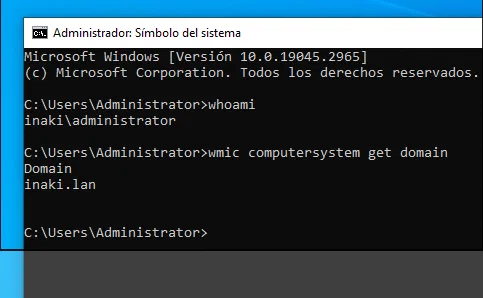
Once inside the domain, the next step will be to create users, groups, OUs and GPOs.
To do this, the following capability must be enabled from PowerShell:
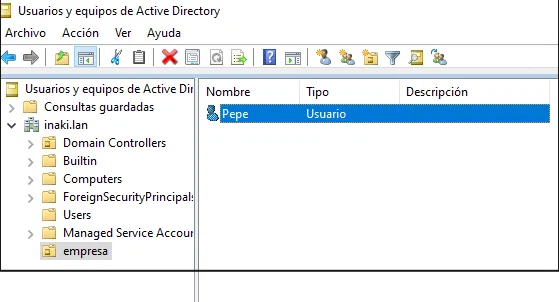
Get-WindowsCapability -Name RSAT* -Online | Add-WindowsCapability -OnlineAfter installing the tools, the Active Directory controller can be managed directly from the Windows client using the Administrator user:
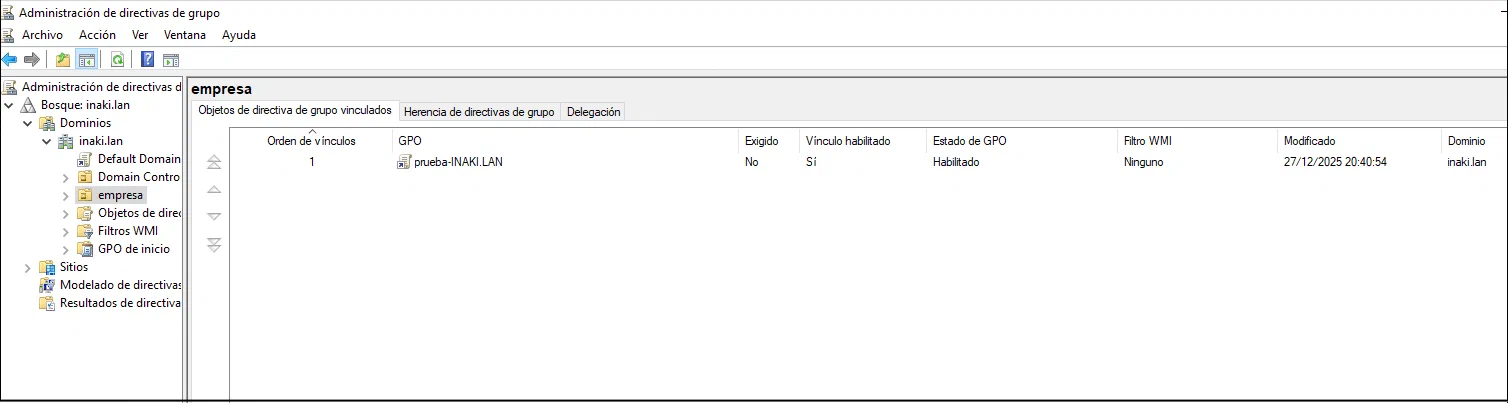
In the same way, it is possible to create and link group policies:
Edit content/_index.md to see this page change.
Add Markdown files to content to create new pages.
Edit your config in config/_default/params.toml.
Learn more in the Docs.