Title here
Summary here
Student: Iñaki Spinardi
Course: 2nd year ASIR
Subject: Elective
System used: Arch Linux
Working path: /home/inaki/Documents/2ASIR3/optativa/recu
Project used: VirtualTableTop
Repository: https://github.com/ArnoldSmith86/virtualtabletop
The objective of this assignment is to create a continuous integration automation process for new developers of the VirtualTableTop web application.
The implemented solution allows Jenkins to automate the complete build and deployment process of the application.
The automation implemented covers the following points:
The project used is the one proposed in the assignment statement:
https://github.com/ArnoldSmith86/virtualtabletopThis project was selected because it meets the requirements of the assignment:
Dockerfile.8272.No alternative project was used, so no additional justification is required.
The following technologies were used to complete the assignment:
| Technology | Use |
|---|---|
| Arch Linux | Local operating system |
| Git | Repository cloning and commit control |
| Jenkins | CI/CD automation |
| Docker | Container building and execution |
| Docker Compose | Local deployment of the web service |
| Minikube | Local Kubernetes cluster |
| kubectl | Kubernetes cluster administration |
| Kubernetes Deployment | Execution of 3 replicas |
| Kubernetes Service | Exposure and load balancing of the application |
| curl | HTTP tests from the terminal |
The solution works as follows:
Jenkinsfile.8272.NodePort Service.The assignment was carried out in the following path:
/home/inaki/Documents/2ASIR3/optativa/recuTo work more comfortably, the following variables were defined:
export VTT_BASE="/home/inaki/Documents/2ASIR3/optativa/recu"
export VTT_REPO="$VTT_BASE/virtualtabletop-dev"
The main directory was created:
mkdir -p "$VTT_BASE"
cd "$VTT_BASE"The required tools were installed using pacman:
sudo pacman -Syu
sudo pacman -S --needed git docker docker-compose jenkins jdk21-openjdk curl minikube kubectl
Java 21 was also configured as the default version:
sudo archlinux-java set java-21-openjdk
java -version
Docker was enabled:
sudo systemctl enable --now docker
sudo systemctl status docker
The users inaki and jenkins were added to the docker group:
sudo usermod -aG docker inaki
sudo usermod -aG docker jenkins
After that, it was necessary to log out and log back in or restart the services so that the docker group permissions were applied correctly.
Docker check:
docker run hello-worldThis check confirms that Docker works correctly on the machine.
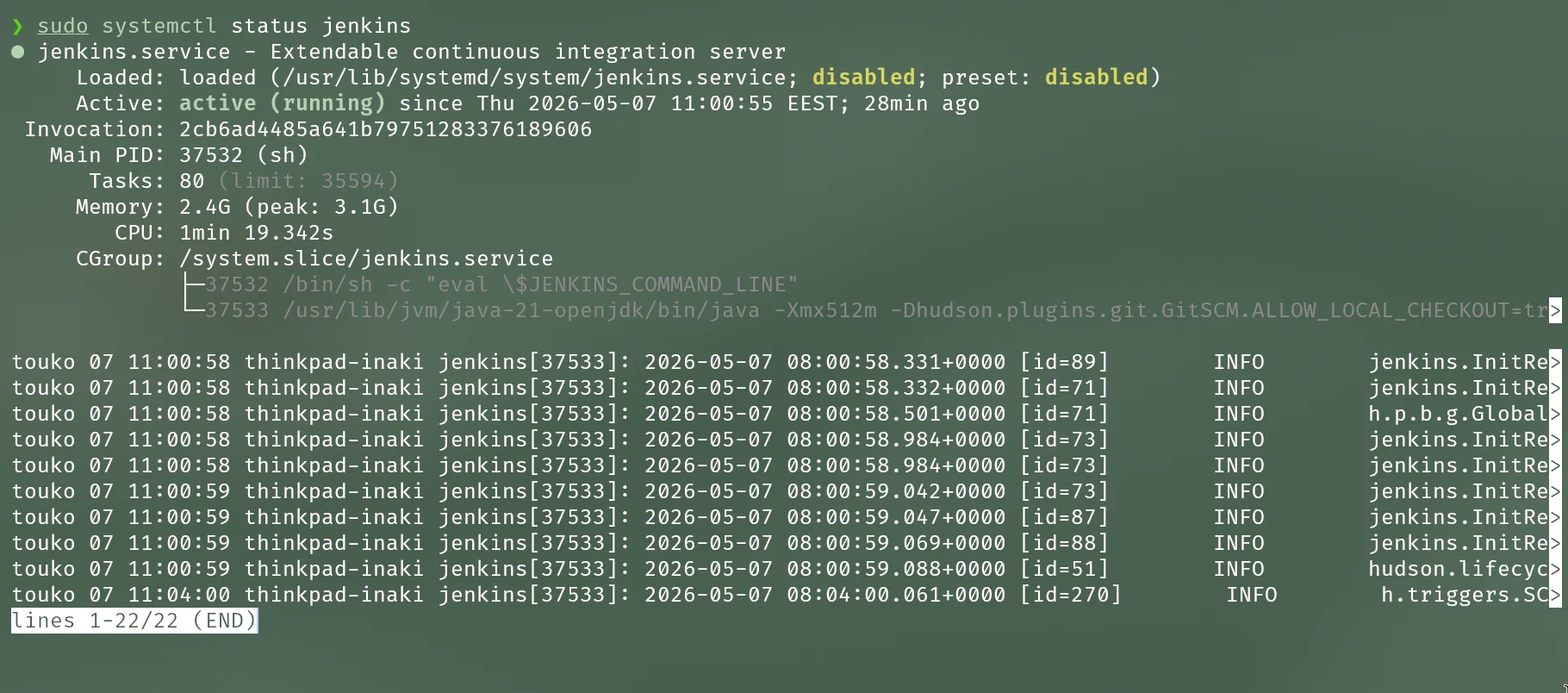
Jenkins was installed as a local service on Arch Linux.
The service was enabled:
sudo systemctl enable --now jenkinsThe status was checked:
sudo systemctl status jenkins --no-pagerIn this assignment, Jenkins was accessible at:
http://localhost:8090The initial password was obtained with:
sudo cat /var/lib/jenkins/secrets/initialAdminPasswordDuring the initial setup, the recommended plugins were installed.
It was also checked that the following plugins were available:
Screenshot:
The VirtualTableTop repository was cloned into the working path:
cd /home/inaki/Documents/2ASIR3/optativa/recu
git clone https://github.com/ArnoldSmith86/virtualtabletop.git virtualtabletop-dev
cd /home/inaki/Documents/2ASIR3/optativa/recu/virtualtabletop-dev
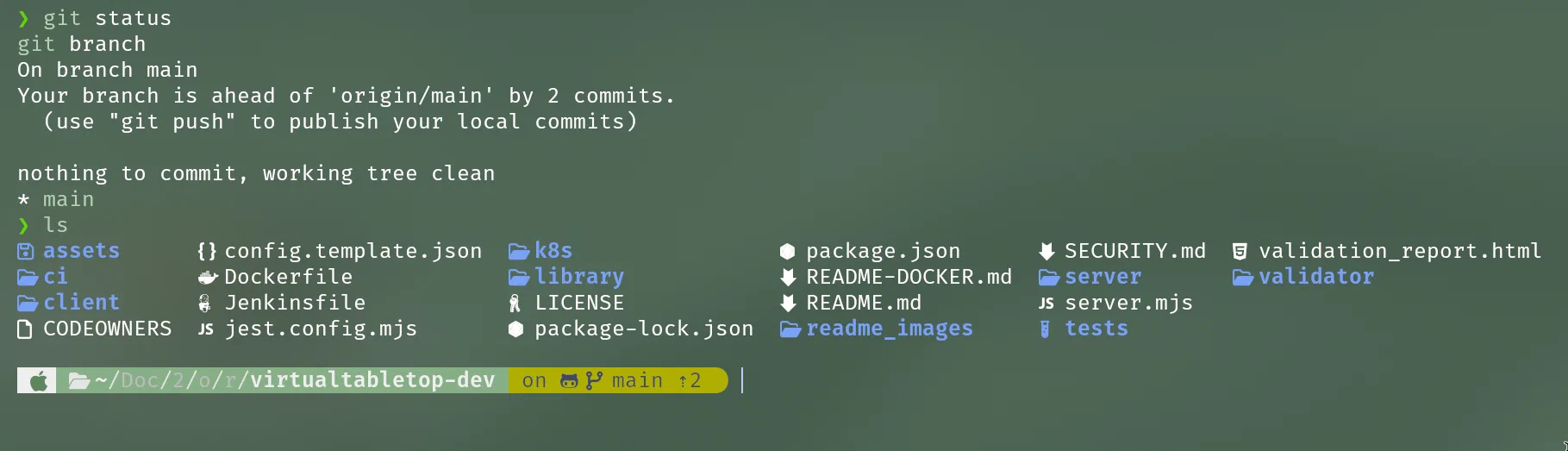
It was checked that the repository had been cloned correctly:
git status
git branch
The existence of important project files was also checked:
ls Dockerfile package.json server.mjsScreenshot:
Since Jenkins runs with the jenkins user, it was necessary to allow it to access the local repository.
The repository is located inside the personal directory of the inaki user:
/home/inaki/Documents/2ASIR3/optativa/recu/virtualtabletop-devFor this reason, execute permissions were granted on the parent directories:
sudo chmod o+x /home/inaki
sudo chmod o+x /home/inaki/Documents
sudo chmod o+x /home/inaki/Documents/2ASIR3
sudo chmod o+x /home/inaki/Documents/2ASIR3/optativa
sudo chmod o+x /home/inaki/Documents/2ASIR3/optativa/recu
Read permissions were also granted to the repository:
sudo chmod -R a+rX /home/inaki/Documents/2ASIR3/optativa/recu/virtualtabletop-devThe repository was marked as safe for Git when used by the jenkins user:
sudo -u jenkins git config --global --add safe.directory /home/inaki/Documents/2ASIR3/optativa/recu/virtualtabletop-devIt was checked that Jenkins could read the repository:
sudo -u jenkins -H git -C /home/inaki/Documents/2ASIR3/optativa/recu/virtualtabletop-dev statusWhen configuring Jenkins to read a local repository using file:///, the following error appeared:
Checkout of Git remote 'file:///home/inaki/Documents/2ASIR3/optativa/recu/virtualtabletop-dev' aborted because it references a local directory, which may be insecure.
You can allow local checkouts anyway by setting the system property 'hudson.plugins.git.GitSCM.ALLOW_LOCAL_CHECKOUT' to true.
For security reasons, Jenkins blocks checkouts from local paths. To allow this, the following property was added:
-Dhudson.plugins.git.GitSCM.ALLOW_LOCAL_CHECKOUT=trueOn Arch Linux, the Jenkins configuration file was edited:
sudo nano /etc/conf.d/jenkinsThe JAVA_ARGS variable was configured as follows:
JAVA_ARGS="-Xmx512m -Dhudson.plugins.git.GitSCM.ALLOW_LOCAL_CHECKOUT=true"Jenkins was then restarted:
sudo systemctl daemon-reload
sudo systemctl restart jenkins
After this, Jenkins was able to perform checkouts from the local repository.
Inside the repository, the necessary CI/CD files were created:
cd /home/inaki/Documents/2ASIR3/optativa/recu/virtualtabletop-dev
mkdir -p ci k8s
The created structure was:
virtualtabletop-dev/
├── Jenkinsfile
├── ci/
│   └── docker-compose.local.yml
└── k8s/
    ├── deployment.yaml
└── service.yamlThe following file was created:
ci/docker-compose.local.ymlContent:
services:
  virtualtabletop:
    image: ${APP_IMAGE:-virtualtabletop-local:latest}
    container_name: virtualtabletop-local
    ports:
      - "8272:8272"
    volumes:
      - vtt-save:/app/save
    restart: unless-stopped

volumes:
  vtt-save:
This file corresponds to the basic section of the assignment.
Its purpose is to:
virtualtabletop-local container.8272.The following file was created:
k8s/deployment.yamlContent:
apiVersion: apps/v1
kind: Deployment
metadata:
  name: vtt-deployment
  labels:
    app: virtualtabletop
spec:
  replicas: 3
  selector:
    matchLabels:
      app: virtualtabletop
  template:
    metadata:
      labels:
        app: virtualtabletop
    spec:
      containers:
        - name: virtualtabletop
          image: IMAGE_PLACEHOLDER
          imagePullPolicy: IfNotPresent
          ports:
            - containerPort: 8272
          readinessProbe:
            httpGet:
              path: /
              port: 8272
            initialDelaySeconds: 10
            periodSeconds: 5
            failureThreshold: 6
          livenessProbe:
            httpGet:
              path: /
              port: 8272
            initialDelaySeconds: 30
            periodSeconds: 10
            failureThreshold: 3
This file implements the advanced section of the assignment.
The main line is:
replicas: 3This indicates that Kubernetes must always maintain three replicas of the application.
Two checks were also added:
readinessProbe
livenessProbe
The readinessProbe allows Kubernetes to know when the Pod is ready to receive traffic.
The livenessProbe allows Kubernetes to detect whether the container stops responding.
The following file was created:
k8s/service.yamlContent:
apiVersion: v1
kind: Service
metadata:
  name: vtt-service
  labels:
    app: virtualtabletop
spec:
  type: NodePort
  selector:
    app: virtualtabletop
  ports:
    - name: http
      port: 8272
      targetPort: 8272
      nodePort: 30080
This Service exposes the application deployed on Kubernetes.
The application becomes accessible using the following port:
30080The access URL has this format:
http://MINIKUBE_IP:30080The Service balances requests between the Pods that have this label:
app: virtualtabletopThe following file was created:
JenkinsfileFull content:
pipeline {
    agent any

    options {
        skipDefaultCheckout(true)
        timestamps()
        disableConcurrentBuilds()
    }

    triggers {
        pollSCM('* * * * *')
    }

    environment {
        IMAGE_NAME = 'virtualtabletop-local'
        IMAGE_TAG = "${BUILD_NUMBER}"
        CONTAINER_NAME = 'virtualtabletop-local'
        HOST_PORT = '8272'

        MINIKUBE_PROFILE = 'vtt-ci'
        KUBECONFIG = '/var/lib/jenkins/.kube/config'
        HOME = '/var/lib/jenkins'
    }

    stages {
        stage('1. Clone repository') {
            steps {
                checkout scm
                sh '''
                    echo "Repository cloned by Jenkins:"
                    pwd
                    git remote -v
                    git log -1 --oneline
                    test -f Dockerfile
                    test -f package.json
                    test -f server.mjs
                '''
            }
        }

        stage('2. Build Docker image') {
            steps {
                sh '''
                    docker build --pull \
                      -t ${IMAGE_NAME}:${IMAGE_TAG} \
                      -t ${IMAGE_NAME}:latest \
                      .
                '''
            }
        }

        stage('3. Validate image') {
            steps {
                sh '''
                    docker image inspect ${IMAGE_NAME}:${IMAGE_TAG} >/dev/null
                    docker run --rm --entrypoint node ${IMAGE_NAME}:${IMAGE_TAG} --check server.mjs
                '''
            }
        }

        stage('4. Basic deployment with Docker Compose') {
            steps {
                sh '''
                    docker compose -f ci/docker-compose.local.yml down --remove-orphans || true
                    APP_IMAGE=${IMAGE_NAME}:${IMAGE_TAG} docker compose -f ci/docker-compose.local.yml up -d

                    echo "Waiting for VirtualTableTop on local Docker..."
                    for i in $(seq 1 30); do
                        if curl -fsS http://127.0.0.1:${HOST_PORT}/ >/dev/null; then
                            echo "Local Docker service OK: http://localhost:${HOST_PORT}"
                            exit 0
                        fi
                        sleep 2
                    done

                    echo "Failed to start local service"
                    docker logs ${CONTAINER_NAME} --tail 100 || true
                    exit 1
                '''
            }
        }

        stage('5. Advanced deployment on Kubernetes') {
            steps {
                sh '''
                    minikube -p ${MINIKUBE_PROFILE} status

                    minikube -p ${MINIKUBE_PROFILE} image load ${IMAGE_NAME}:${IMAGE_TAG}

                    sed "s#IMAGE_PLACEHOLDER#${IMAGE_NAME}:${IMAGE_TAG}#g" \
                      k8s/deployment.yaml > k8s/deployment.rendered.yaml

                    kubectl --context ${MINIKUBE_PROFILE} apply -f k8s/deployment.rendered.yaml
                    kubectl --context ${MINIKUBE_PROFILE} apply -f k8s/service.yaml

                    kubectl --context ${MINIKUBE_PROFILE} rollout status deployment/vtt-deployment --timeout=180s

                    echo "Pods:"
                    kubectl --context ${MINIKUBE_PROFILE} get pods -l app=virtualtabletop -o wide

                    echo "Service:"
                    kubectl --context ${MINIKUBE_PROFILE} get svc vtt-service
                '''
            }
        }

        stage('6. Kubernetes access test') {
            steps {
                sh '''
                    NODE_IP=$(minikube -p ${MINIKUBE_PROFILE} ip)
                    URL="http://${NODE_IP}:30080"

                    echo "Testing $URL"
                    for i in $(seq 1 30); do
                        if curl -fsS "$URL/" >/dev/null; then
                            echo "Kubernetes service OK: $URL"
                            exit 0
                        fi
                        sleep 2
                    done

                    echo "Failed to access Kubernetes service"
                    kubectl --context ${MINIKUBE_PROFILE} get all
                    exit 1
                '''
            }
        }

        stage('7. Self-healing demonstration') {
            steps {
                sh '''
                    echo "Deleting one pod to demonstrate that Kubernetes recreates it:"
                    POD=$(kubectl --context ${MINIKUBE_PROFILE} get pods -l app=virtualtabletop -o jsonpath='{.items[0].metadata.name}')
                    kubectl --context ${MINIKUBE_PROFILE} delete pod "$POD"

                    sleep 10

                    echo "Status after deletion:"
                    kubectl --context ${MINIKUBE_PROFILE} get pods -l app=virtualtabletop -o wide
                '''
            }
        }
    }

    post {
        always {
            sh '''
                echo "Docker summary:"
                docker ps --filter name=${CONTAINER_NAME} || true

                echo "Kubernetes summary:"
                kubectl --context ${MINIKUBE_PROFILE} get deployment,svc,pods -l app=virtualtabletop || true
            '''
        }

        success {
            echo 'Pipeline completed successfully.'
        }

        failure {
            echo 'Pipeline failed. Check the Jenkins console.'
        }
    }
}The pipeline is divided into seven main stages.
stage('1. Clone repository')Jenkins obtains the code from the repository configured in the job:
file:///home/inaki/Documents/2ASIR3/optativa/recu/virtualtabletop-devIt also checks that the required files exist:
Dockerfile
package.json
server.mjs
This stage demonstrates that Jenkins can clone the project automatically.
stage('2. Build Docker image')It builds a new Docker image:
docker build --pull \
  -t virtualtabletop-local:${BUILD_NUMBER} \
  -t virtualtabletop-local:latest \
  .
Each Jenkins execution generates a different tag using the build number.
Example:
virtualtabletop-local:1
virtualtabletop-local:2
virtualtabletop-local:3stage('3. Validate image')It checks that the image exists:
docker image inspect virtualtabletop-local:${BUILD_NUMBER}It also validates that server.mjs has no syntax errors:
docker run --rm --entrypoint node virtualtabletop-local:${BUILD_NUMBER} --check server.mjsstage('4. Basic deployment with Docker Compose')First, it stops previous containers:
docker compose -f ci/docker-compose.local.yml down --remove-orphansThen it starts the new version:
APP_IMAGE=virtualtabletop-local:${BUILD_NUMBER} docker compose -f ci/docker-compose.local.yml up -dFinally, it checks that the web service responds:
curl -fsS http://127.0.0.1:8272/This completes the basic section of the assignment.
stage('5. Advanced deployment on Kubernetes')First, it checks that Minikube is running:
minikube -p vtt-ci statusThen it loads the image generated by Jenkins into Minikube:
minikube -p vtt-ci image load virtualtabletop-local:${BUILD_NUMBER}It then generates the final Kubernetes manifest by replacing IMAGE_PLACEHOLDER with the real image:
sed "s#IMAGE_PLACEHOLDER#virtualtabletop-local:${BUILD_NUMBER}#g" \
  k8s/deployment.yaml > k8s/deployment.rendered.yaml
Finally, it applies the Deployment and the Service:
kubectl --context vtt-ci apply -f k8s/deployment.rendered.yaml
kubectl --context vtt-ci apply -f k8s/service.yaml
And waits for the deployment to finish correctly:
kubectl --context vtt-ci rollout status deployment/vtt-deployment --timeout=180sstage('6. Kubernetes access test')It obtains the Minikube IP:
minikube -p vtt-ci ipThen it tests the URL:
http://MINIKUBE_IP:30080The test is performed with:
curl -fsS "$URL/"stage('7. Self-healing demonstration')This stage obtains the name of one of the Pods:
kubectl --context vtt-ci get pods -l app=virtualtabletop -o jsonpath='{.items[0].metadata.name}'Then it deletes it:
kubectl --context vtt-ci delete pod "$POD"Kubernetes must automatically create another Pod to maintain the 3 replicas defined in the Deployment.
Once the files were created, they were added to the repository:
cd /home/inaki/Documents/2ASIR3/optativa/recu/virtualtabletop-dev

git add Jenkinsfile ci/docker-compose.local.yml k8s/deployment.yaml k8s/service.yaml
git commit -m "Add local CI/CD with Jenkins Docker and Kubernetes"
The history was checked:
git log --oneline -5This commit contains the required files so that Jenkins can automate the deployment.
The local Kubernetes cluster was started with Minikube.
It is important that Minikube runs with the jenkins user, because Jenkins is the user that will execute the Kubernetes commands during the pipeline.
Command used:
sudo -u jenkins -H minikube start --profile vtt-ci --driver=dockerStatus check:
sudo -u jenkins -H minikube -p vtt-ci statusNode check:
sudo -u jenkins -H kubectl --context vtt-ci get nodesOutput obtained:
NAME     STATUS   ROLES           AGE   VERSION
vtt-ci   Ready    control-plane   7m    v1.35.1
Screenshot:
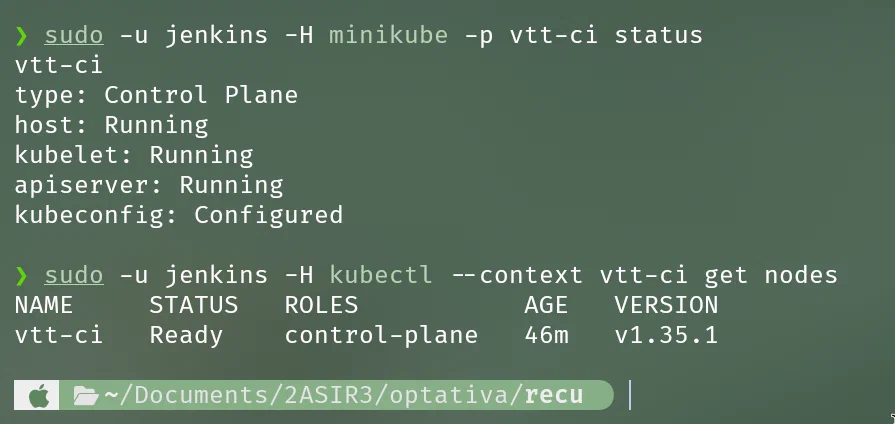
This screenshot demonstrates that the local Kubernetes cluster is working.
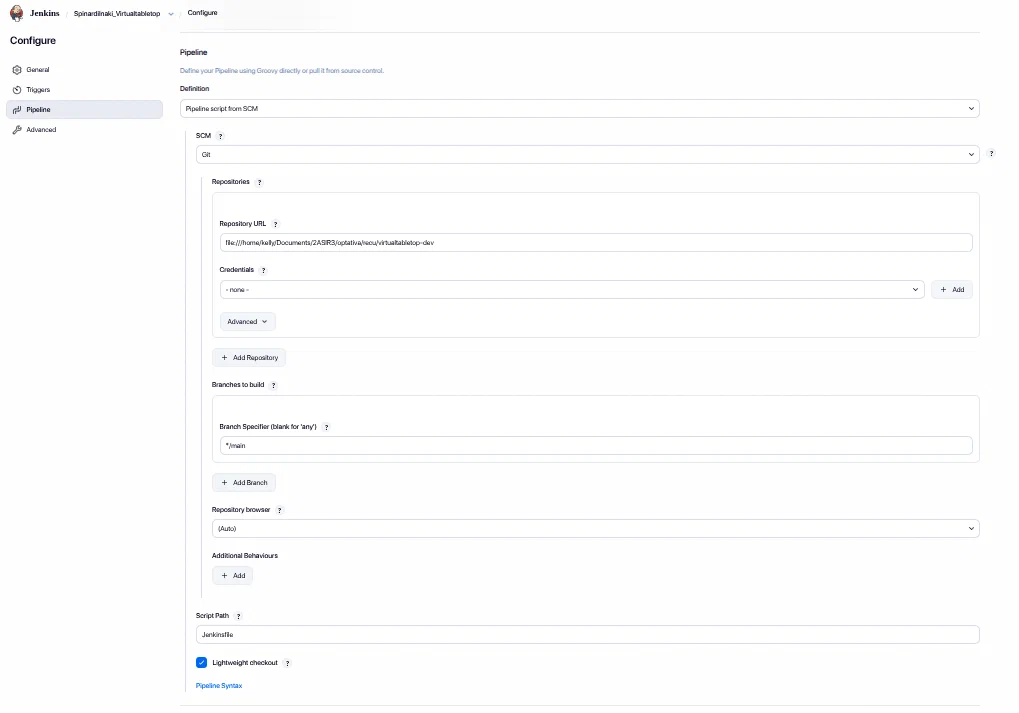
A new Jenkins job was created.
Configuration:
New Item
Name: SpinardiInaki_Virtualtabletop
Type: Pipeline
Pipeline configuration:
Definition: Pipeline script from SCM
SCM: Git
Repository URL: file:///home/inaki/Documents/2ASIR3/optativa/recu/virtualtabletop-dev
Branch Specifier: */main
Script Path: Jenkinsfile
Screenshot:
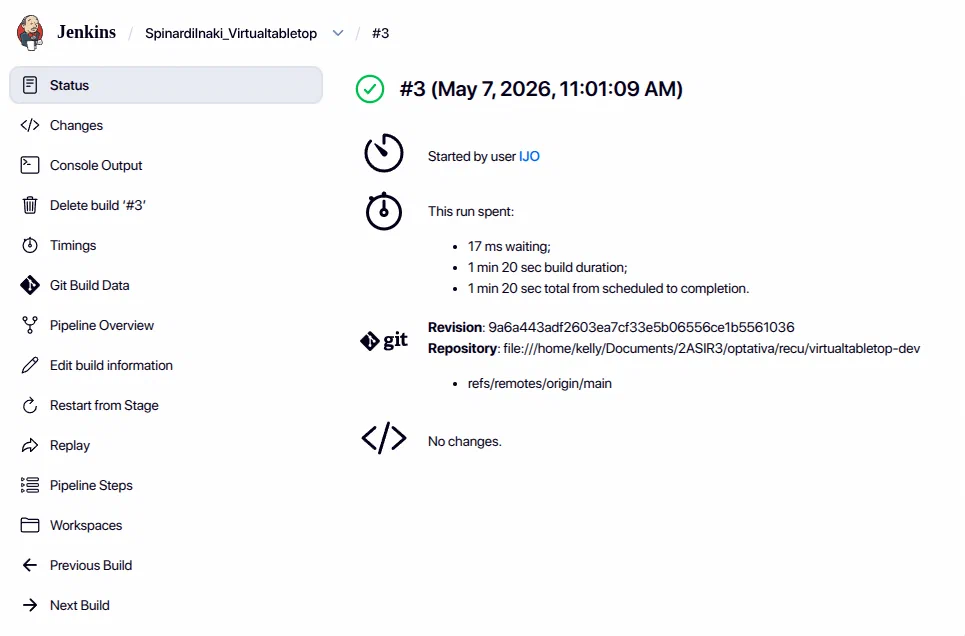
The first execution was launched manually from Jenkins using:
Build NowThe execution finished successfully.
Screenshot:
The build console was also reviewed.
Screenshot:
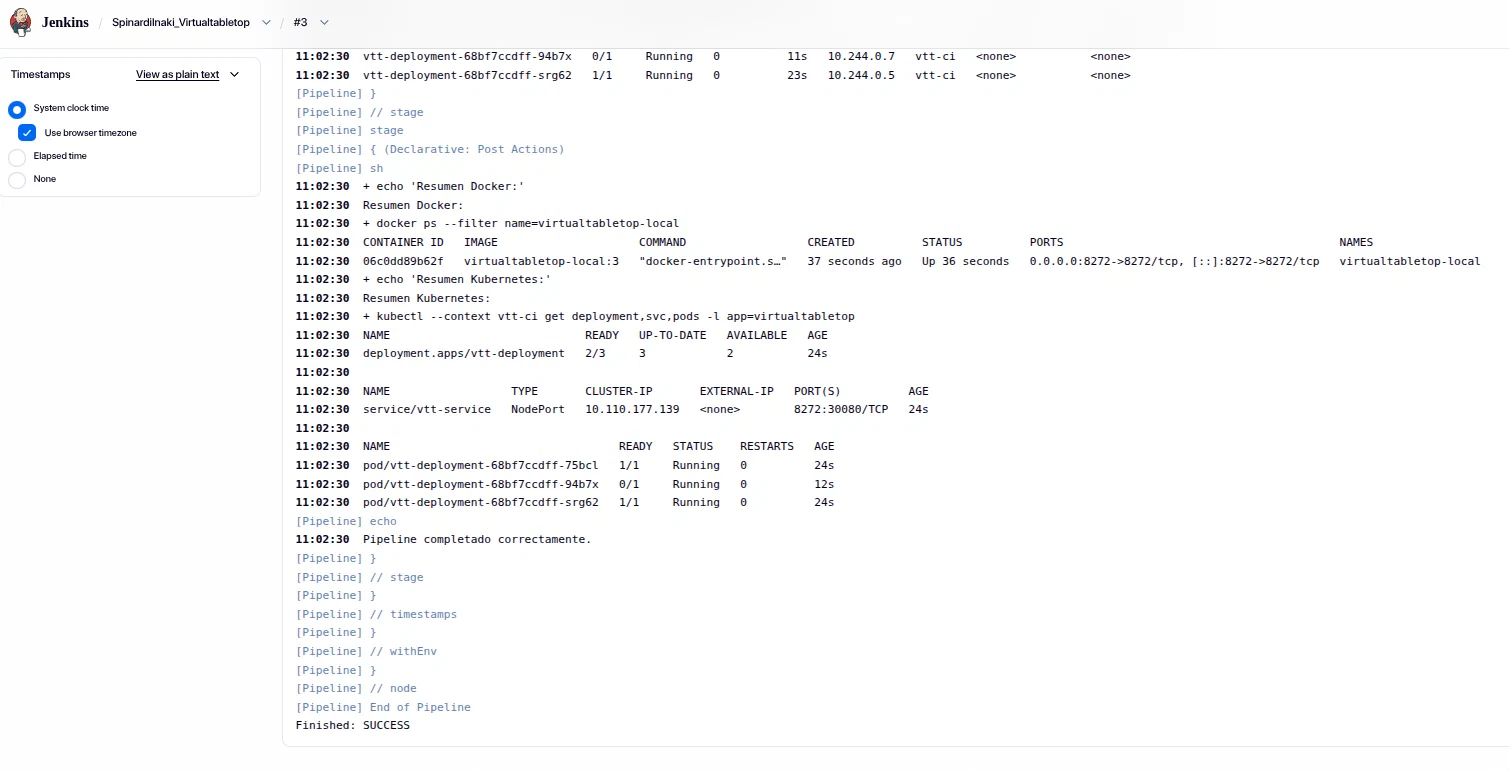
This demonstrates that Jenkins executes the whole process automatically.
After running the pipeline, it was checked that the container was running:
docker psThe output must show the following container:
virtualtabletop-localThe port must also be visible:
8272:8272Screenshot:
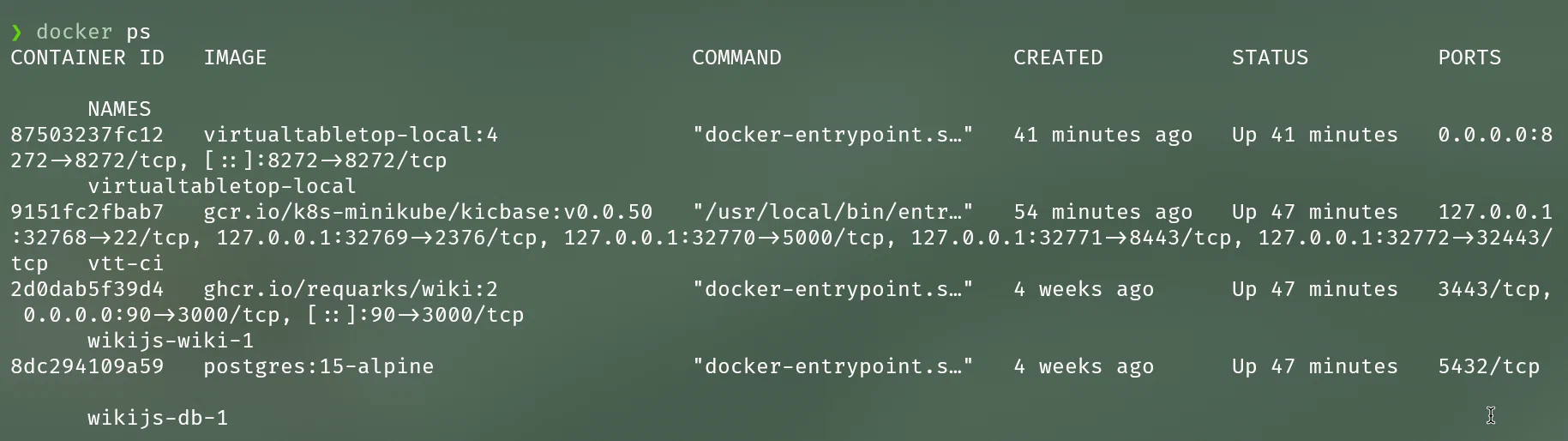
HTTP access was then checked:
curl -I http://localhost:8272The correct output must be similar to:
HTTP/1.1 200 OKThe application was opened in the browser:
http://localhost:8272Screenshot:
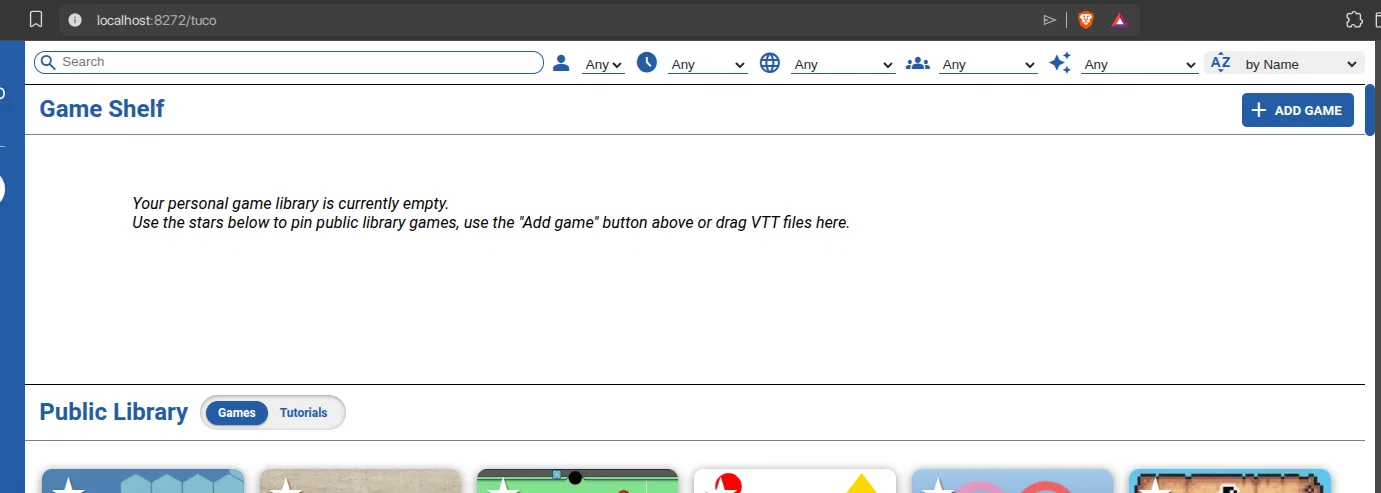
This demonstrates the basic section:
The status of the Deployment was checked:
sudo -u jenkins -H kubectl --context vtt-ci get deploymentExpected output:
NAME             READY   UP-TO-DATE   AVAILABLE
vtt-deployment   3/3     3            3
The Pods were checked:
sudo -u jenkins -H kubectl --context vtt-ci get pods -o wideExpected output:
NAME                              READY   STATUS    RESTARTS
vtt-deployment-xxxxxxxxxx-xxxxx   1/1     Running   0
vtt-deployment-xxxxxxxxxx-xxxxx   1/1     Running   0
vtt-deployment-xxxxxxxxxx-xxxxx   1/1     Running   0
The Service was checked:
sudo -u jenkins -H kubectl --context vtt-ci get svcExpected output:
NAME          TYPE       CLUSTER-IP      EXTERNAL-IP   PORT(S)
vtt-service   NodePort   ...             <none>        8272:30080/TCP
Screenshot:

This is one of the most important screenshots of the submission, because it demonstrates that Kubernetes is running 3 replicas.
The Minikube IP was obtained:
sudo -u jenkins -H minikube -p vtt-ci ipThe access URL was built:
URL="http://$(sudo -u jenkins -H minikube -p vtt-ci ip):30080"
echo "$URL"
Example:
http://192.168.49.2:30080It was checked with curl:
curl -I "$URL"Expected output:
HTTP/1.1 200 OKIt was then opened in the browser.
Screenshot:
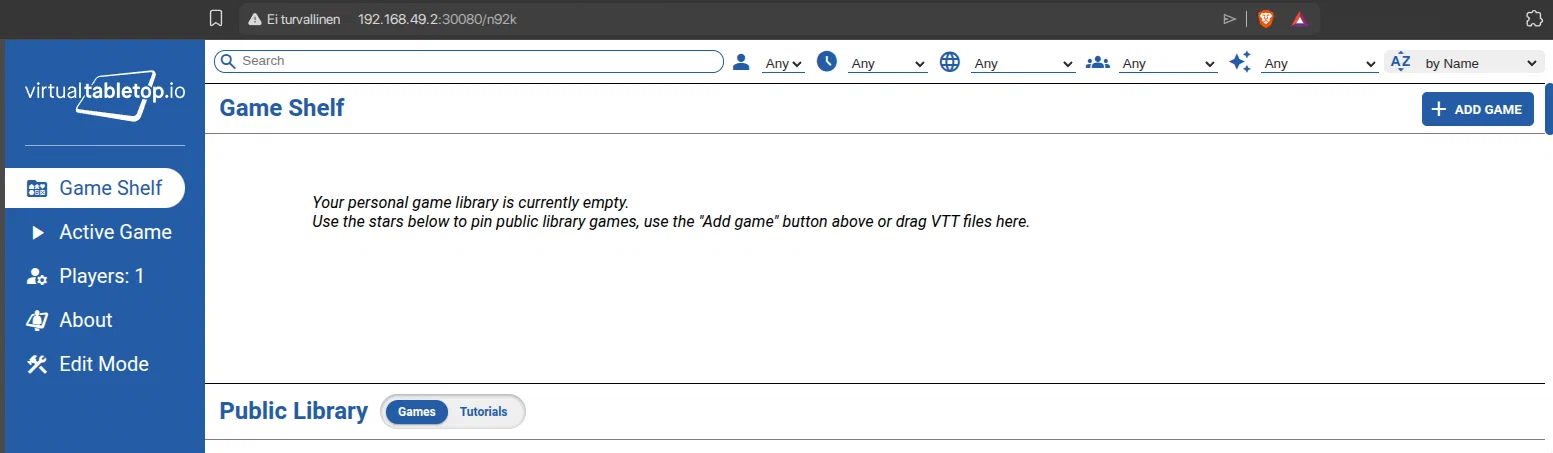
This screenshot demonstrates that the Kubernetes Service is exposing the application correctly.
To demonstrate that Kubernetes maintains the replicas, the Pods were first listed:
sudo -u jenkins -H kubectl --context vtt-ci get podsThen one of the Pods was deleted:
POD=$(sudo -u jenkins -H kubectl --context vtt-ci get pods -l app=virtualtabletop -o jsonpath='{.items[0].metadata.name}')
sudo -u jenkins -H kubectl --context vtt-ci delete pod "$POD"
Screenshot:

Then it was checked that Kubernetes automatically created another Pod:
sudo -u jenkins -H kubectl --context vtt-ci get pods -o wideScreenshot:

This screenshot shows that 3 Pods exist again.
This demonstrates that Kubernetes maintains the desired state defined in the Deployment:
replicas: 3If a Pod fails or is deleted, Kubernetes creates another one to recover the configured number of replicas.
To demonstrate automation, the web interface was modified by adding a visible banner.
The following command was executed:
cd /home/inaki/Documents/2ASIR3/optativa/recu/virtualtabletop-dev

sed -i '/<body class="loading">/a\ <div id="ciBanner" style="position:fixed;z-index:99999;top:0;left:0;right:0;background:#fff3cd;color:#000;padding:8px;text-align:center;font-weight:bold">Automatic Jenkins ASIR deployment</div>' client/room.html
The change was reviewed:
git diff client/room.htmlThen the commit was made:
git add client/room.html
git commit -m "Change interface to test automatic deployment"
Screenshot:
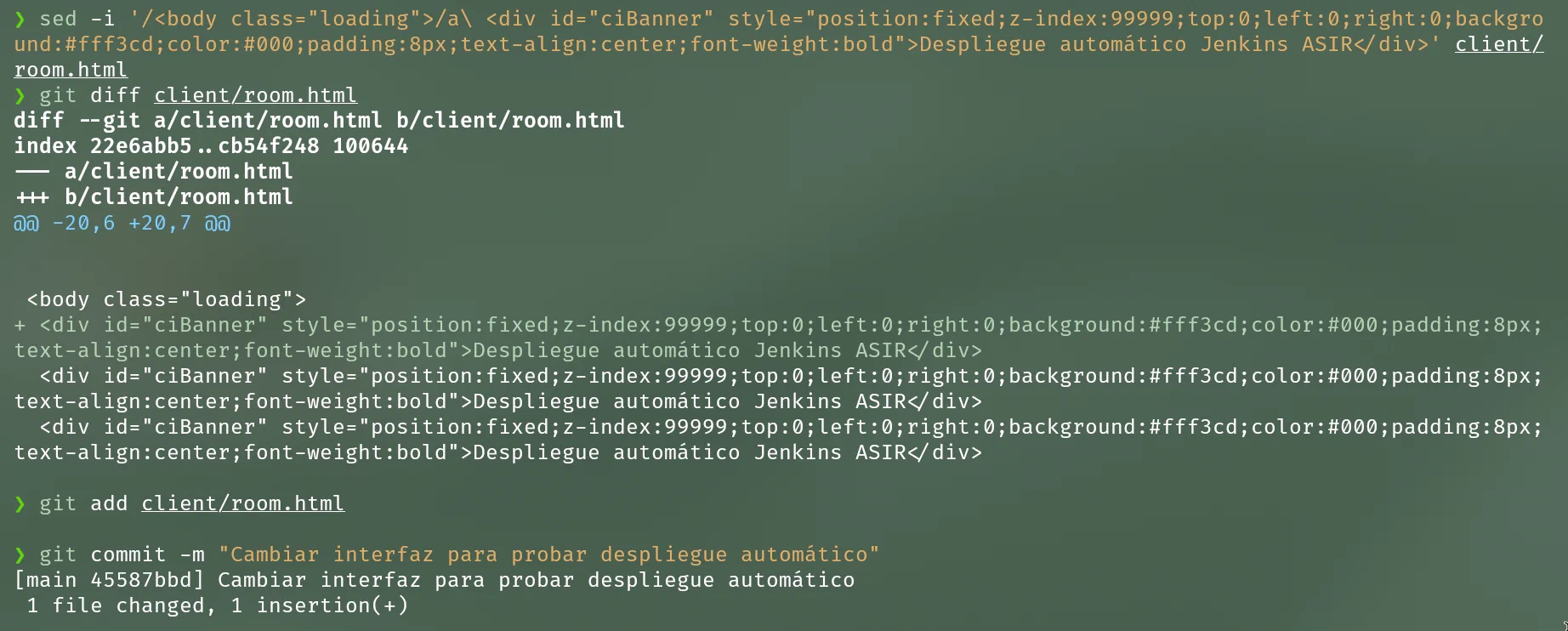
After the commit, Jenkins automatically launched a new pipeline execution.
Screenshot:
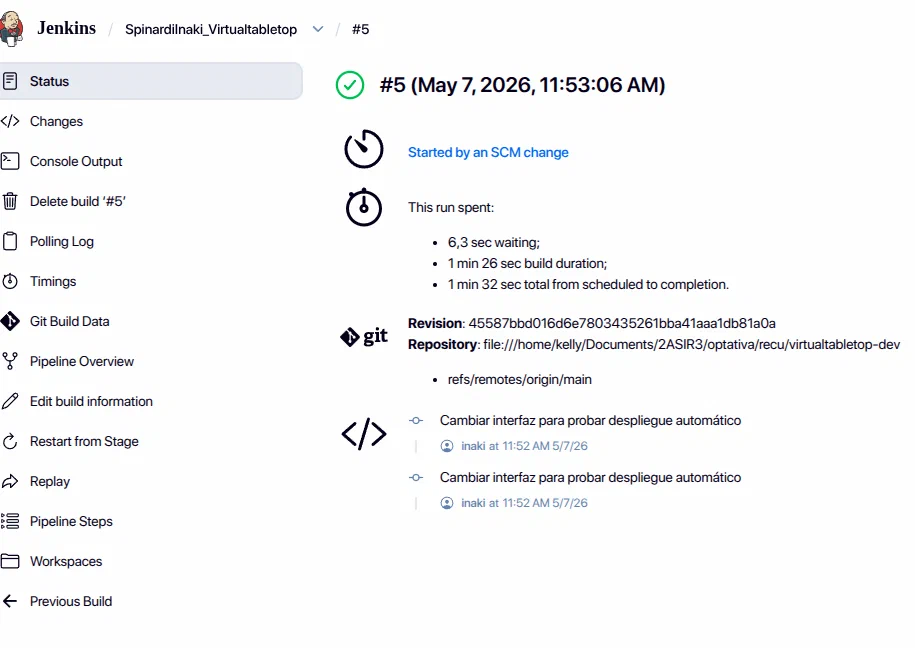
In the Jenkins console, it can be seen that the build was executed after detecting an SCM change.
This demonstrates that Jenkins does not depend only on the Build Now button.
After the automatic build, the application was opened again.
Access through local Docker:
http://localhost:8272Access through Kubernetes:
URL="http://$(sudo -u jenkins -H minikube -p vtt-ci ip):30080"
echo "$URL"
The added banner must be visible on the web page:
Automatic Jenkins ASIR deploymentScreenshot:
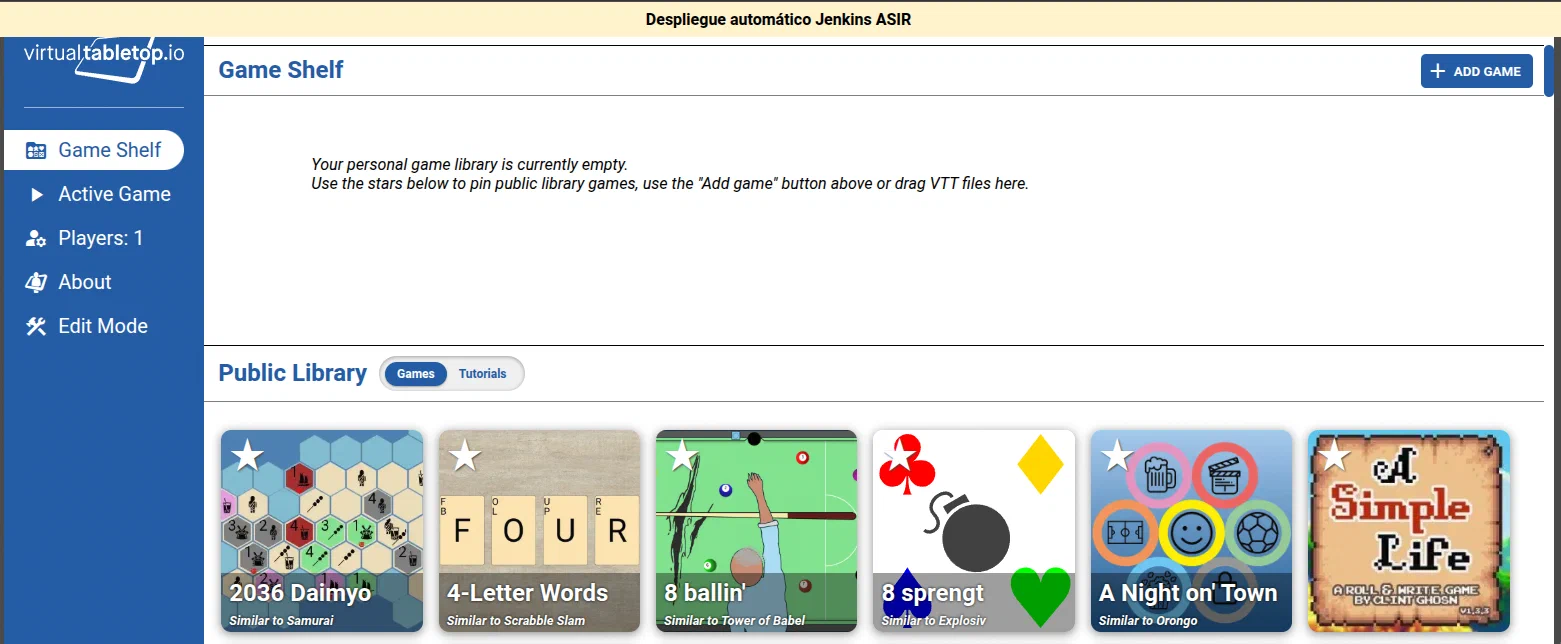
This screenshot demonstrates the complete cycle:
Several problems appeared during the assignment.
Initially, the minikube command failed with an error similar to:
/usr/local/bin/minikube: rivi 1: lauseoppivirhe lähellä odottamatonta avainsanaa "<"
<?xml version='1.0' encoding='UTF-8'?><Error><Code>NoSuchKey</Code><Message>The specified key does not exist.</Message>
The cause was that /usr/local/bin/minikube was not the correct binary, but an incorrectly downloaded XML file.
This was checked with:
which minikube
file /usr/local/bin/minikube
head -n 3 /usr/local/bin/minikube
Applied solution:
sudo rm -f /usr/local/bin/minikube
sudo pacman -S --needed minikube kubectl
Then it was checked:
which minikube
minikube version
The correct result was that Minikube was running from:
/usr/bin/minikubeJenkins showed this error:
permission denied while trying to connect to the docker API at unix:///var/run/docker.sockThe cause was that the jenkins user did not have effective permissions over the Docker socket.
Applied solution:
sudo usermod -aG docker jenkins
sudo systemctl restart docker
sudo systemctl restart jenkins
Check:
sudo -u jenkins -H docker psThe correct output showed the container table, so Jenkins now had access to Docker.
Jenkins showed this error:
Checkout of Git remote 'file:///home/inaki/Documents/2ASIR3/optativa/recu/virtualtabletop-dev' aborted because it references a local directory, which may be insecure.The cause was that Jenkins blocks local repositories for security reasons.
Solution applied on Arch Linux:
sudo nano /etc/conf.d/jenkinsThe following was configured:
JAVA_ARGS="-Xmx512m -Dhudson.plugins.git.GitSCM.ALLOW_LOCAL_CHECKOUT=true"Jenkins was then restarted:
sudo systemctl daemon-reload
sudo systemctl restart jenkins
It was checked with:
ps aux | grep '[j]enkins.war'The following had to appear:
-Dhudson.plugins.git.GitSCM.ALLOW_LOCAL_CHECKOUT=trueAfter this, Jenkins was able to clone the local repository correctly.
The pipeline executes commands such as:
minikube -p vtt-ci status
kubectl --context vtt-ci get nodes
For this reason, Minikube was started with the jenkins user:
sudo -u jenkins -H minikube start --profile vtt-ci --driver=dockerThis way, Jenkins has direct access to the correct Kubernetes context.
The following final checks were performed.
docker ps
curl -I http://localhost:8272
Expected result:
HTTP/1.1 200 OKsudo -u jenkins -H kubectl --context vtt-ci get nodes
sudo -u jenkins -H kubectl --context vtt-ci get deployment
sudo -u jenkins -H kubectl --context vtt-ci get pods -o wide
sudo -u jenkins -H kubectl --context vtt-ci get svcExpected result:
vtt-deployment 3/3URL="http://$(sudo -u jenkins -H minikube -p vtt-ci ip):30080"
echo "$URL"
curl -I "$URL"Expected result:
HTTP/1.1 200 OKgit log --oneline -5After the commit, Jenkins automatically executed a new build.
The web page showed the change:
Automatic Jenkins ASIR deploymentTogether with this report, the files required to reproduce the exercise are submitted:
Jenkinsfile
ci/docker-compose.local.yml
k8s/deployment.yaml
k8s/service.yaml
The full VirtualTableTop source code is not submitted, since the assignment statement indicates that the Jenkins files and the other required files must be submitted, except for the VirtualTableTop code.
The submission structure is as follows:
submission/
├── report.pdf
├── Jenkinsfile
├── ci/
│   └── docker-compose.local.yml
└── k8s/
    ├── deployment.yaml
└── service.yamlThe assignment has been completed successfully.
A local CI/CD solution using Jenkins on Arch Linux has been implemented. Jenkins clones the repository, builds the Docker image, validates the image, stops the previous container and starts the new version of VirtualTableTop using Docker Compose.
The advanced deployment on Kubernetes using Minikube has also been implemented. The application runs through a Deployment with 3 replicas and is exposed through a NodePort Service. In addition, it has been demonstrated that Kubernetes automatically recreates deleted Pods in order to maintain the desired state.
Finally, commit-based automation has been implemented. When a change is made in the repository and committed, Jenkins detects the change and runs the pipeline again, deploying the new version without manual intervention.
Therefore, the three requested levels are fulfilled:
| Level | Requirement | Status |
|---|---|---|
| Basic | Jenkins clones the repository, builds and starts the web service | Completed |
| Advanced | Kubernetes with 3 replicas and load balancing through a Service | Completed |
| Advanced++ | Automatic redeployment when a commit is made | Completed |
sudo pacman -Syu
sudo pacman -S --needed git docker docker-compose jenkins jdk21-openjdk curl minikube kubectlsudo systemctl enable --now docker
sudo usermod -aG docker inaki
sudo usermod -aG docker jenkinssudo systemctl enable --now jenkins
sudo systemctl status jenkins --no-pagercd /home/inaki/Documents/2ASIR3/optativa/recu
git clone https://github.com/ArnoldSmith86/virtualtabletop.git virtualtabletop-devsudo chmod o+x /home/inaki
sudo chmod o+x /home/inaki/Documents
sudo chmod o+x /home/inaki/Documents/2ASIR3
sudo chmod o+x /home/inaki/Documents/2ASIR3/optativa
sudo chmod o+x /home/inaki/Documents/2ASIR3/optativa/recu
sudo chmod -R a+rX /home/inaki/Documents/2ASIR3/optativa/recu/virtualtabletop-dev
sudo -u jenkins git config --global --add safe.directory /home/inaki/Documents/2ASIR3/optativa/recu/virtualtabletop-devsudo nano /etc/conf.d/jenkinsAdd or modify:
JAVA_ARGS="-Xmx512m -Dhudson.plugins.git.GitSCM.ALLOW_LOCAL_CHECKOUT=true"Restart:
sudo systemctl daemon-reload
sudo systemctl restart jenkinssudo -u jenkins -H minikube start --profile vtt-ci --driver=docker
sudo -u jenkins -H kubectl --context vtt-ci get nodesdocker ps
curl -I http://localhost:8272sudo -u jenkins -H kubectl --context vtt-ci get deployment
sudo -u jenkins -H kubectl --context vtt-ci get pods -o wide
sudo -u jenkins -H kubectl --context vtt-ci get svcURL="http://$(sudo -u jenkins -H minikube -p vtt-ci ip):30080"
echo "$URL"
curl -I "$URL"POD=$(sudo -u jenkins -H kubectl --context vtt-ci get pods -l app=virtualtabletop -o jsonpath='{.items[0].metadata.name}')
sudo -u jenkins -H kubectl --context vtt-ci delete pod "$POD"
sudo -u jenkins -H kubectl --context vtt-ci get pods -o widenano /home/inaki/Documents/2ASIR3/optativa/recu/virtualtabletop-dev/.git/hooks/post-commitContent:
#!/bin/sh
curl -s "http://localhost:8090/git/notifyCommit?url=file:///home/inaki/Documents/2ASIR3/optativa/recu/virtualtabletop-dev" >/dev/null || true
Permissions:
chmod +x /home/inaki/Documents/2ASIR3/optativa/recu/virtualtabletop-dev/.git/hooks/post-commitcd /home/inaki/Documents/2ASIR3/optativa/recu/virtualtabletop-dev
sed -i '/<body class="loading">/a\ <div id="ciBanner" style="position:fixed;z-index:99999;top:0;left:0;right:0;background:#fff3cd;color:#000;padding:8px;text-align:center;font-weight:bold">Automatic Jenkins ASIR deployment</div>' client/room.html
git add client/room.html
git commit -m "Change interface to test automatic deployment"The screenshots included in the report are:
| Image | Content |
|---|---|
img/04-jenkins-servicio.png | Jenkins running |
img/05-jenkins-job-config.png | Jenkins job configuration |
img/06-build-manual-ok.png | First successful manual execution |
img/07-console-checkout-build.png | Pipeline console |
img/08-docker-ps.png | Running Docker container |
img/09-web-docker-local.png | Web running on local Docker |
img/10-minikube-ready.png | Minikube and Kubernetes node Ready |
img/11-kubernetes-3-pods.png | Deployment with 3 Pods |
img/12-web-kubernetes.png | Web running from Kubernetes |
img/13-delete-pod.png | Manual deletion of a Pod |
img/14-pod-recreado.png | Pod automatically recreated |
img/15-commit-cambio.png | Commit with the web change |
img/16-build-automatico.png | Automatic build in Jenkins |
img/17-web-cambio-automatico.png | Web showing the deployed change |
pipeline {
    agent any

    options {
        skipDefaultCheckout(true)
        timestamps()
        disableConcurrentBuilds()
    }

    triggers {
        pollSCM('* * * * *')
    }

    environment {
        IMAGE_NAME = 'virtualtabletop-local'
        IMAGE_TAG = "${BUILD_NUMBER}"
        CONTAINER_NAME = 'virtualtabletop-local'
        HOST_PORT = '8272'

        MINIKUBE_PROFILE = 'vtt-ci'
        KUBECONFIG = '/var/lib/jenkins/.kube/config'
        HOME = '/var/lib/jenkins'
    }

    stages {
        stage('1. Clone repository') {
            steps {
                checkout scm
                sh '''
                    echo "Repository cloned by Jenkins:"
                    pwd
                    git remote -v
                    git log -1 --oneline
                    test -f Dockerfile
                    test -f package.json
                    test -f server.mjs
                '''
            }
        }

        stage('2. Build Docker image') {
            steps {
                sh '''
                    docker build --pull \
                      -t ${IMAGE_NAME}:${IMAGE_TAG} \
                      -t ${IMAGE_NAME}:latest \
                      .
                '''
            }
        }

        stage('3. Validate image') {
            steps {
                sh '''
                    docker image inspect ${IMAGE_NAME}:${IMAGE_TAG} >/dev/null
                    docker run --rm --entrypoint node ${IMAGE_NAME}:${IMAGE_TAG} --check server.mjs
                '''
            }
        }

        stage('4. Basic deployment with Docker Compose') {
            steps {
                sh '''
                    docker compose -f ci/docker-compose.local.yml down --remove-orphans || true
                    APP_IMAGE=${IMAGE_NAME}:${IMAGE_TAG} docker compose -f ci/docker-compose.local.yml up -d

                    echo "Waiting for VirtualTableTop on local Docker..."
                    for i in $(seq 1 30); do
                        if curl -fsS http://127.0.0.1:${HOST_PORT}/ >/dev/null; then
                            echo "Local Docker service OK: http://localhost:${HOST_PORT}"
                            exit 0
                        fi
                        sleep 2
                    done

                    echo "Failed to start local service"
                    docker logs ${CONTAINER_NAME} --tail 100 || true
                    exit 1
                '''
            }
        }

        stage('5. Advanced deployment on Kubernetes') {
            steps {
                sh '''
                    minikube -p ${MINIKUBE_PROFILE} status

                    minikube -p ${MINIKUBE_PROFILE} image load ${IMAGE_NAME}:${IMAGE_TAG}

                    sed "s#IMAGE_PLACEHOLDER#${IMAGE_NAME}:${IMAGE_TAG}#g" \
                      k8s/deployment.yaml > k8s/deployment.rendered.yaml

                    kubectl --context ${MINIKUBE_PROFILE} apply -f k8s/deployment.rendered.yaml
                    kubectl --context ${MINIKUBE_PROFILE} apply -f k8s/service.yaml

                    kubectl --context ${MINIKUBE_PROFILE} rollout status deployment/vtt-deployment --timeout=180s

                    echo "Pods:"
                    kubectl --context ${MINIKUBE_PROFILE} get pods -l app=virtualtabletop -o wide

                    echo "Service:"
                    kubectl --context ${MINIKUBE_PROFILE} get svc vtt-service
                '''
            }
        }

        stage('6. Kubernetes access test') {
            steps {
                sh '''
                    NODE_IP=$(minikube -p ${MINIKUBE_PROFILE} ip)
                    URL="http://${NODE_IP}:30080"

                    echo "Testing $URL"
                    for i in $(seq 1 30); do
                        if curl -fsS "$URL/" >/dev/null; then
                            echo "Kubernetes service OK: $URL"
                            exit 0
                        fi
                        sleep 2
                    done

                    echo "Failed to access Kubernetes service"
                    kubectl --context ${MINIKUBE_PROFILE} get all
                    exit 1
                '''
            }
        }

        stage('7. Self-healing demonstration') {
            steps {
                sh '''
                    echo "Deleting one pod to demonstrate that Kubernetes recreates it:"
                    POD=$(kubectl --context ${MINIKUBE_PROFILE} get pods -l app=virtualtabletop -o jsonpath='{.items[0].metadata.name}')
                    kubectl --context ${MINIKUBE_PROFILE} delete pod "$POD"

                    sleep 10

                    echo "Status after deletion:"
                    kubectl --context ${MINIKUBE_PROFILE} get pods -l app=virtualtabletop -o wide
                '''
            }
        }
    }

    post {
        always {
            sh '''
                echo "Docker summary:"
                docker ps --filter name=${CONTAINER_NAME} || true

                echo "Kubernetes summary:"
                kubectl --context ${MINIKUBE_PROFILE} get deployment,svc,pods -l app=virtualtabletop || true
            '''
        }

        success {
            echo 'Pipeline completed successfully.'
        }

        failure {
            echo 'Pipeline failed. Check the Jenkins console.'
        }
    }
}services:
virtualtabletop:
image: ${APP_IMAGE:-virtualtabletop-local:latest}
container_name: virtualtabletop-local
ports:
- "8272:8272"
volumes:
- vtt-save:/app/save
restart: unless-stopped
volumes:
vtt-save:apiVersion: apps/v1
kind: Deployment
metadata:
name: vtt-deployment
labels:
app: virtualtabletop
spec:
replicas: 3
selector:
matchLabels:
app: virtualtabletop
template:
metadata:
labels:
app: virtualtabletop
spec:
containers:
- name: virtualtabletop
image: IMAGE_PLACEHOLDER
imagePullPolicy: IfNotPresent
ports:
- containerPort: 8272
readinessProbe:
httpGet:
path: /
port: 8272
initialDelaySeconds: 10
periodSeconds: 5
failureThreshold: 6
livenessProbe:
httpGet:
path: /
port: 8272
initialDelaySeconds: 30
periodSeconds: 10
failureThreshold: 3apiVersion: v1
kind: Service
metadata:
name: vtt-service
labels:
app: virtualtabletop
spec:
type: NodePort
selector:
app: virtualtabletop
ports:
- name: http
port: 8272
targetPort: 8272
nodePort: 30080Edit content/_index.md to see this page change.
Add Markdown files to content to create new pages.
Edit your config in config/_default/params.toml.
Learn more in the Docs.